The UV calculator shows what a single print or a whole job on the EufyMake E1 UV printer really costs: ink, electricity, the machine, your working time and material. It is for hobby printers and small sellers who want to set a selling price.
Open the tool: https://inkbuddy.app/tools/uv-rechner/?lang=en
¶ Step by step
- Open the Calculator tab. The fields already hold sensible starting values, and the Calculation card on the right (below the inputs on a phone) updates straight away.
- Under Total ink, enter how much ink the print needs, for example
1.2ml. The buttons − 1 ml, − 0.5 ml, + 0.5 ml and + 1 ml change it in steps. - Under Additional Costs, enter the Print Duration (20 min here), plus Preparation and Post-processing in minutes and, if you add something per piece, the Material (per unit).
- For several identical prints, set the Quantity. The card then also shows the price per unit.
- Leave the Error Allowance at 20% or change it, and pick the markup you want to earn under Margin (30% here).
- Read the result in the Calculation card: Production Price, Selling Price and Profit.
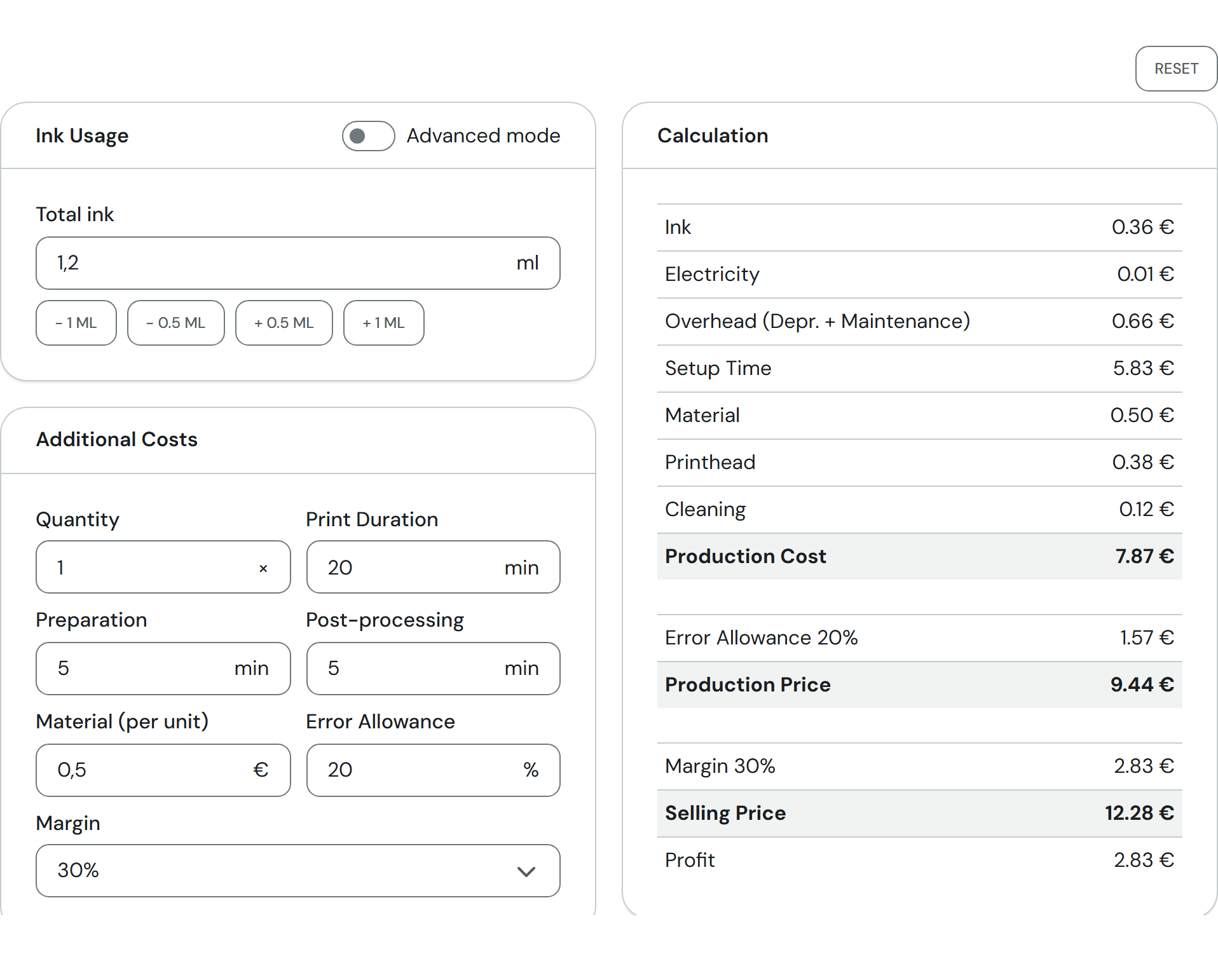
The inputs are on the left, the calculation on the right. All example numbers on this page come from this picture.
¶ Entering ink per colour
If you know the amounts per colour, switch on Advanced mode at the top of the Ink Usage card. You then see six fields: Cyan, Magenta, Yellow, Black, White and Gloss (clear varnish). Together they make up the ink amount. The buttons − 0.1 ml all and + 0.1 ml all change all six fields at once.
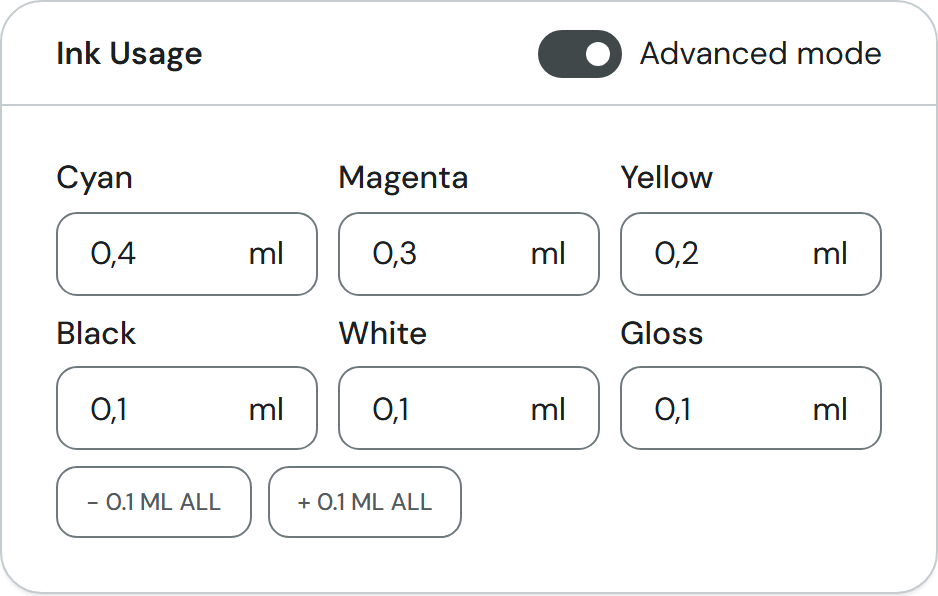
In the picture the six values add up to 1.2 ml again. If you switch back, Total ink shows the sum. If you enter an amount in simple mode, the calculator spreads it evenly over the six colours and rounds each share to 0.01 ml. The sum can therefore differ by a few hundredths of a millilitre; otherwise this does not change the result, because every colour costs the same per ml.
¶ Fields and settings
¶ Ink Usage
| Field | What it means | Typical value |
|---|---|---|
| Total ink | Total ink amount for the print (simple mode). More ink means a higher Ink line. | 0.6 ml (starting value) |
| Advanced mode | Switches to one field per colour. Your choice is remembered in your browser. | off |
| Cyan, Magenta, Yellow, Black, White, Gloss | Ink amount per colour in advanced mode. The sum is calculated. | 0.1 ml each (starting value) |
| − 0.1 ml all / + 0.1 ml all | Subtracts 0.1 ml from, or adds it to, each of the six colour fields (never below 0). | – |
¶ Consumables
| Field | What it means | Typical value |
|---|---|---|
| Cleaning Fluid | Amount of cleaning fluid for the whole job. Below the field you see what one millilitre costs (e.g. 29.99 € / 380 ml = 0.079 €/ml). | 1.5 ml |
You only see this card when Cost cleaning in the settings is set to per job in ml. With the default by replacement interval there is nothing to enter here.
¶ Additional Costs
| Field | What it means | Typical value |
|---|---|---|
| Quantity | How many times the same print is made. Ink, electricity, overhead, setup time, material and printhead are multiplied by it, and with by replacement interval cleaning as well. | 1 |
| Print Duration | Machine running time per print. Electricity and overhead depend on it. | 3 min |
| Preparation | Your working time before the print, per print. | 5 min |
| Post-processing | Your working time after the print, per print. | 5 min |
| Material (per unit) | Anything else you use per piece, such as the blank. | 0.50 € |
| Error Allowance | Percentage added to the production cost to cover misprints and scrap. At 0 the Error Allowance line and the Production Price disappear. | 20% |
| Margin | Your markup on the Production Price. Choices are —, 10%, 20%, 30%, 40% and Internal Use. With — there is no selling price. | 30% |
Reset at the top right of the Calculator tab puts all fields back to the starting values. Your browser remembers your inputs, so you find them again on your next visit.
¶ Settings (tab)
The Settings tab holds the Cost Configuration: the prices and machine data the calculator works with. You can change them, and the calculator uses the new values at once. They are stored only in your browser, not for anyone else.
| Field | What it means | Value in the calculator |
|---|---|---|
| Currency (card Display) | Currency symbol in all prices. Only the symbol changes, nothing is converted. Besides common currencies there is — Custom symbol — with up to 3 characters. | EUR (€) |
| Ink set price (6 colors + cleaning) | Price of the complete ink set. It is spread over seven cartridges. | 209.99 € |
| Volume per cartridge | Contents of one cartridge. This gives the price per ml of ink (here 0.30 €). | 100 ml |
| Machine wattage | Power draw while printing. | 80 W |
| Electricity rate | Your price per kilowatt hour. | 0.45 €/kWh |
| Machine purchase price | What the printer cost. | 2,799 € |
| Depreciation period | The number of years you spread the purchase price over. | 3 years |
| Maintenance budget | What you plan to spend on maintenance per year, without the printhead. Below the field it says: "Suggested: 60 when the printhead is costed by ink volume, otherwise 399." (see Cost printhead) | 60 €/year |
| Operating hours/year | How many hours a year the machine prints. Purchase price and maintenance are spread over these. | 500 h/year |
| Cleaning fluid price | Price of one cleaning cartridge or bottle. | 29.99 € / bottle |
| Cleaning fluid volume | Contents of one bottle. Only counts with per job in ml. | 380 ml |
| Cost cleaning | by replacement interval: the cartridge runs empty over time, so its yearly cost is spread over the operating hours. per job in ml: you enter the amount per job yourself. | by replacement interval |
| Replace cleaning cartridge every | The cleaning cartridge is empty after this many months. | 2 months |
| Cost printhead | by ink volume: every millilitre printed carries its share of the next printhead. in the maintenance budget: the printhead is part of the maintenance budget; if that still holds the suggested 60 €, it jumps to 399 €. If you switch back, 399 € jumps back to 60 €. | by ink volume |
| Printhead lifetime (total ink) | How much ink (colour, white and gloss together) a printhead typically lasts, usually 1,000 to 1,500 ml. | 1,250 ml |
| Printhead replacement price | What a new printhead costs, about 399 € with the Care plan or 599 € without. | 399 € |
| Setup hourly rate | What an hour of your working time is worth. | 35 €/h |
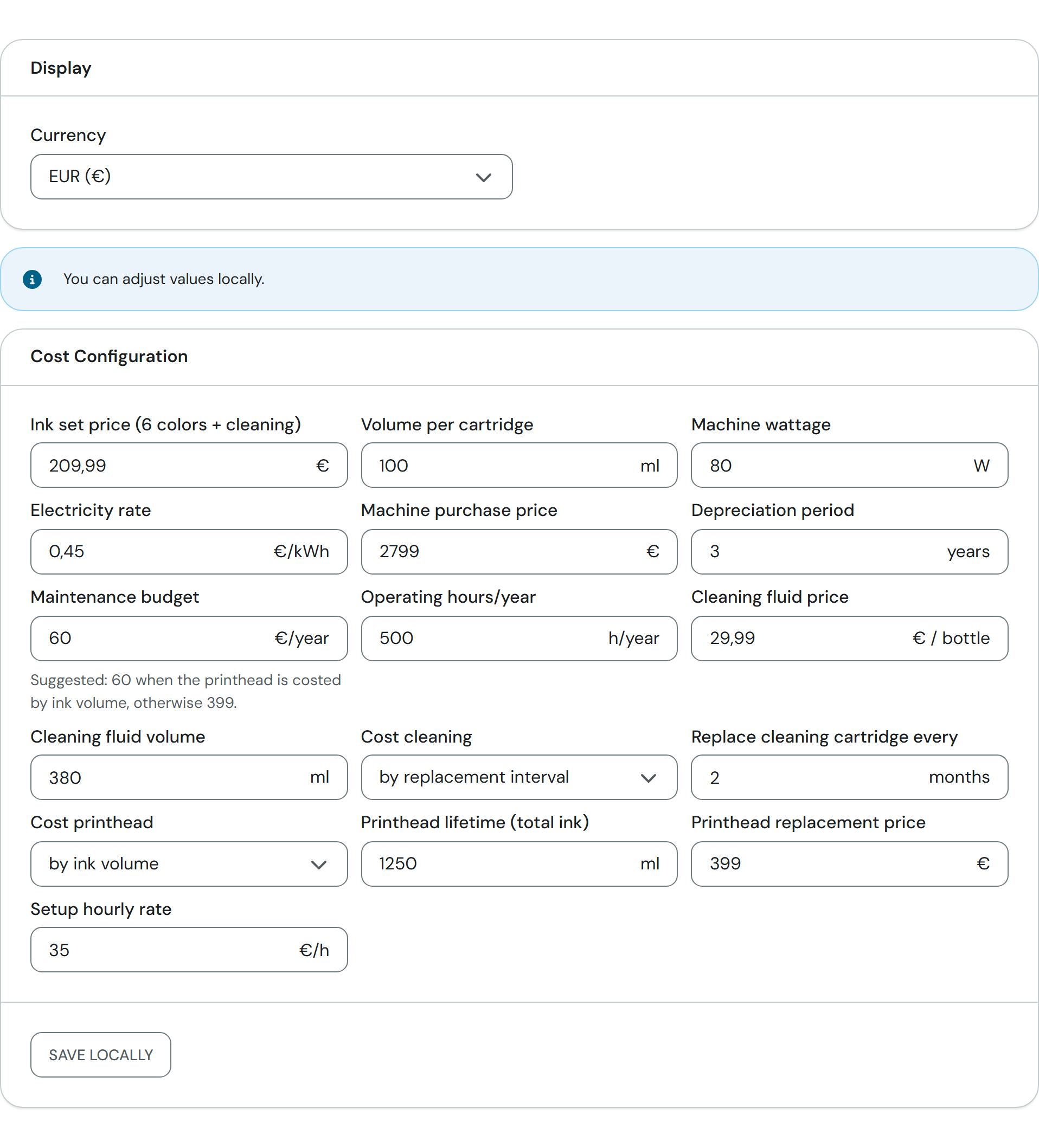
Save locally keeps your changed values for later visits; the tab then shows the badge Local values active. Reset in the Settings tab takes you back to the values of the page. Without Save locally, changes only last until you reload the page.
¶ Result
The Calculation card appears as soon as you have entered any amount, time or material.
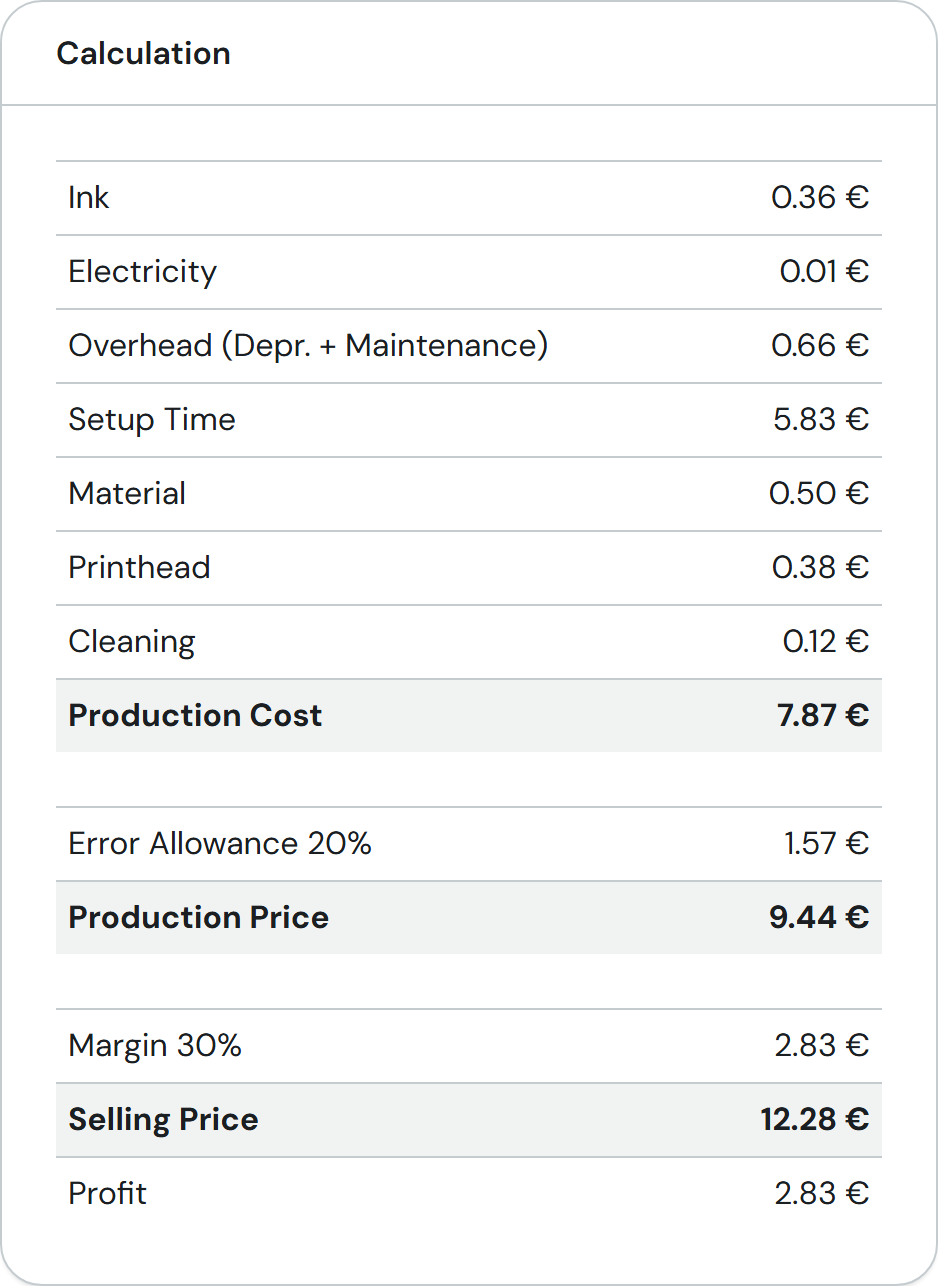
| Line | What goes into it | Example |
|---|---|---|
| Ink | Ink amount times price per ml (1.2 ml × 0.30 €) | 0.36 € |
| Electricity | Machine wattage over the print duration times electricity rate (80 W, 20 min) | 0.01 € |
| Overhead (Depr. + Maintenance) | Share of purchase price and maintenance for the print duration; the longer the print, the more | 0.66 € |
| Setup Time | Preparation plus post-processing (10 min) times hourly rate | 5.83 € |
| Material | Your material value per unit | 0.50 € |
| Printhead | Ink amount times printhead price divided by lifetime (1.2 ml × 399 € / 1,250 ml); dropped when the printhead is part of the maintenance budget | 0.38 € |
| Cleaning | Yearly cost of the cleaning cartridge (29.99 € × 6), spread over the operating hours, for the print duration, times Quantity. With per job in ml: amount times price per ml, once per job | 0.12 € |
| Production Cost | Sum of all lines above | 7.87 € |
| Error Allowance 20% | Added on top of the production cost (7.87 € × 20%) | 1.57 € |
| Production Price | Production cost plus error allowance: the least you should get back. Only visible when the error allowance is above 0 | 9.44 € |
| Margin 30% | Markup on the production price (9.44 € × 30%) | 2.83 € |
| Selling Price | Production price plus margin | 12.28 € |
| Profit | What stays with you after all costs and the error allowance (equal to the margin) | 2.83 € |
With a Quantity above 1, the cost lines except Cleaning get a suffix such as "Ink (5×)", and Production Cost, Production Price, Selling Price and Profit show the price per unit underneath. If you have access to Bundles, use Add to Bundle at the bottom of the card to add the part to a bundle draft.
¶ Tips and FAQ
I do not know the ink amount. Start with an estimate and compare it with the use of your ink set after a few prints. Then adjust the value.
What does "Internal Use" mean under Margin? You are printing for yourself, not to sell. The calculator then adds a fixed 10% (line "Internal Use Adj.") and shows no profit.
My numbers are gone or differ from yesterday. Inputs and locally saved values live in your browser. They are gone if you clear the site data or use another device or browser.
Can I calculate inside a field? Yes, in any number field. Type a number, then +, -, * or /, then the next number. Enter, = or Tab writes the result into the field; Esc cancels. It calculates from left to right.
Why is the overhead so high for long prints? Purchase price and maintenance are spread over your operating hours, so every minute of machine time costs a fixed share. Adjust Operating hours/year if you print more or less.
The Settings tab shows different values than my machine. The defaults are example values. Enter your own prices and click Save locally.