The FDM calculator shows what a part from your FDM 3D printer (a filament printer) really costs you: filament, electricity, machine wear and your own working time. It is for hobby printers and small sellers who want to calculate their prices instead of guessing them.
Link to the tool: https://inkbuddy.app/tools/fdm-rechner/?lang=en
¶ Step by step
Example: a PLA part on the Bambu Lab P1S, 150 g of filament, 4 hours 30 minutes of print time.
- Open the calculator. On the Calculator tab, pick your printer under Printer, for example "Bambu Lab P1S". Printer purchase price and Watt surcharge fill in by themselves.
- Pick your filament under Material, for example "PLA Basic (PLA)". Price per kg and Power draw fill in by themselves. If a value is wrong for you, overwrite it in the field.
- Under Print Parameters, enter the values from your slicer: Filament 150 g, Print duration (hours) 4, Print duration (minutes) 30. Leave Preparation and Post-processing at 5 minutes or adjust them.
- Set Quantity to the number of parts you print.
- Under Pricing, set the Error Allowance (20 % here) and choose a Margin (30 % here).
- Read the costs and the selling price in the Calculation card on the right. It updates with every change.
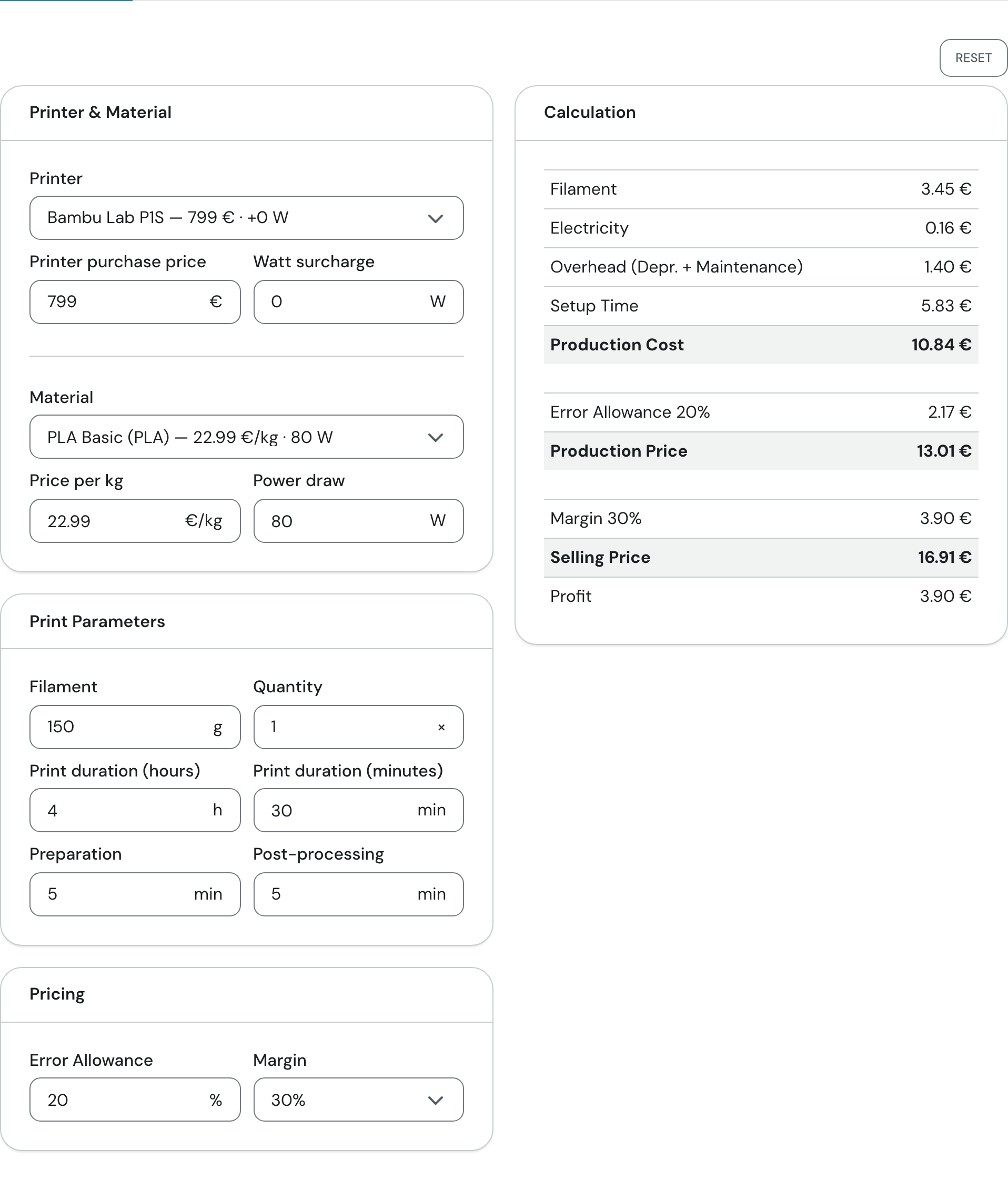
The inputs of the example are on the left; the "Calculation" card with the result is on the right.
¶ Fields and settings
¶ Printer & Material
For the fields on the Calculator tab, the "Typical value" column shows the starting value, followed by the value from the example above. Where there is only one value, it is both.
| Field | What it means | Typical value |
|---|---|---|
| Printer | Preset for purchase price and watts. Choose "—" (nothing selected), a printer from the list, or Custom. The list shows each printer's price and watt surcharge. | "—"; in the example Bambu Lab P1S |
| Printer purchase price | Drives the overhead: the price is spread over the depreciation period, so the more expensive the printer, the higher the cost per print hour. | 0 €; in the example 799 € |
| Watt surcharge | Extra power draw of the printer, added to the power draw of the material. Together they give the electricity consumption. | 0 W (up to 50 W depending on the printer) |
| Material | Preset for price and power draw of the filament. Also "—", a material from the list, or Custom. | "—"; in the example PLA Basic (PLA) |
| Price per kg | Price of a filament spool per kilogram. This produces the filament cost. | 0 €/kg; in the example 22.99 €/kg |
| Power draw | Electrical power while printing with this material (nozzle and bed temperatures differ by material). | 0 W; in the example 80 W |
You can change the price and watt fields at any time. If they differ from the preset, a manual badge appears with a Restore preset value button. Choosing another preset discards your changes. Choosing "—" sets both fields to 0. If you type values without having chosen anything, the selection switches to Custom. If your saved preset no longer exists (deleted or deactivated), the selection shows Custom on your next visit; the values you last used are kept.
¶ Print Parameters
| Field | What it means | Typical value |
|---|---|---|
| Filament | Amount of filament for one part, as your slicer reports it. | 100 g; in the example 150 g |
| Quantity | How many parts you print. All costs are multiplied by the quantity; the price per unit is shown below. At least 1. | 1 × |
| Print duration (hours) and Print duration (minutes) | Pure print time for one part. It drives electricity and overhead. Minutes range from 0 to 59. | 1 h 0 min; in the example 4 h 30 min |
| Preparation | Your time before the print (slicing, preparing the bed, changing filament), per part. | 5 min |
| Post-processing | Your time after the print (removing, taking off supports, cleaning), per part. | 5 min |
¶ Pricing
| Field | What it means | Typical value |
|---|---|---|
| Error Allowance | Percentage added to the production cost as a reserve for failed prints and scrap. At 0 the line disappears. | 20 % |
| Margin | Your profit markup on the production price (after the error allowance). Options: "—" (no margin), 10 %, 20 %, 30 %, 40 % and Internal Use. | "—"; in the example 30 % |
With Internal Use the calculator uses a fixed 10 % and labels the line "Internal Use Adj.". There is no profit line in that case.
¶ Settings tab
The Settings tab holds the cost values that apply to every calculation. They are pre-filled with the operator's values; you can adjust them for yourself.
| Field | What it means | Typical value |
|---|---|---|
| Currency ("Display" card) | Changes only the currency symbol shown, not the numbers. There is a list of common currencies and a custom symbol of up to 3 characters. | EUR (€) |
| Electricity rate | Your price per kilowatt hour. Multiplied by power draw and print time it gives the electricity cost. | 0.45 €/kWh |
| Depreciation period | Over how many years the printer "wears out". The purchase price is divided by this number. At least 1. | 3 years |
| Maintenance budget | Yearly cost of nozzles, spare parts and repairs. | 200 €/year |
| Operating hours/year | How many hours the printer runs per year. Depreciation and maintenance are spread over them. At least 1. | 1500 h/year |
| Setup hourly rate | What an hour of your own work is worth. Applies to preparation and post-processing. | 35 €/h |
The Printers and Materials tables below list the available presets. As a visitor you can only view them; enter your own values directly in the calculator.
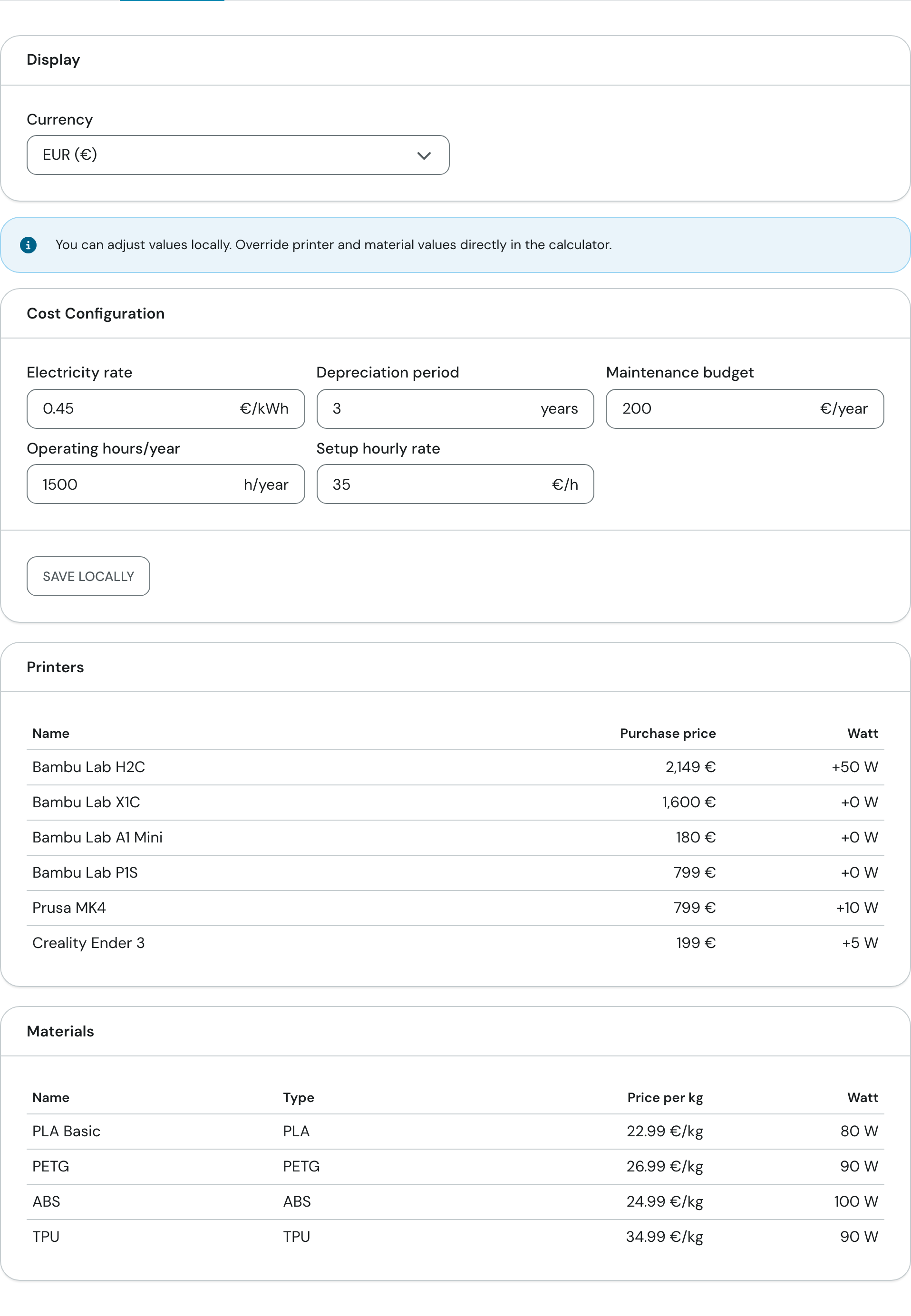
Currency and cost configuration are at the top, the preset lists below.
¶ Result
The Calculation card appears as soon as you have entered filament or a print duration. It shows three blocks:
- Production Cost – the pure cost, the sum of four lines:
- Filament: weight times price per kg.
- Electricity: power draw of printer and material, times print time, times electricity rate.
- Overhead (Depr. + Maintenance): purchase price divided by the depreciation period, plus the maintenance budget, divided by the operating hours and multiplied by the print time.
- Setup Time: preparation plus post-processing, times the setup hourly rate.
- Production Price – production cost plus the error allowance (only visible when the error allowance is above 0).
- Selling Price – production price plus margin, followed by your Profit (the margin in money). Visible once you have chosen a margin.
With more than one unit, the four cost lines show the quantity, for example "Filament (3×)", and Production Cost, Production Price, Selling Price and Profit also show the price per unit underneath.
The example in the picture: Filament 3.45 € + Electricity 0.16 € + Overhead 1.40 € + Setup Time 5.83 € = Production Cost 10.84 €. Adding the 20 % error allowance (2.17 €) gives a Production Price of 13.01 €. With a 30 % margin (3.90 €) you arrive at a Selling Price of 16.91 €, of which 3.90 € is profit.
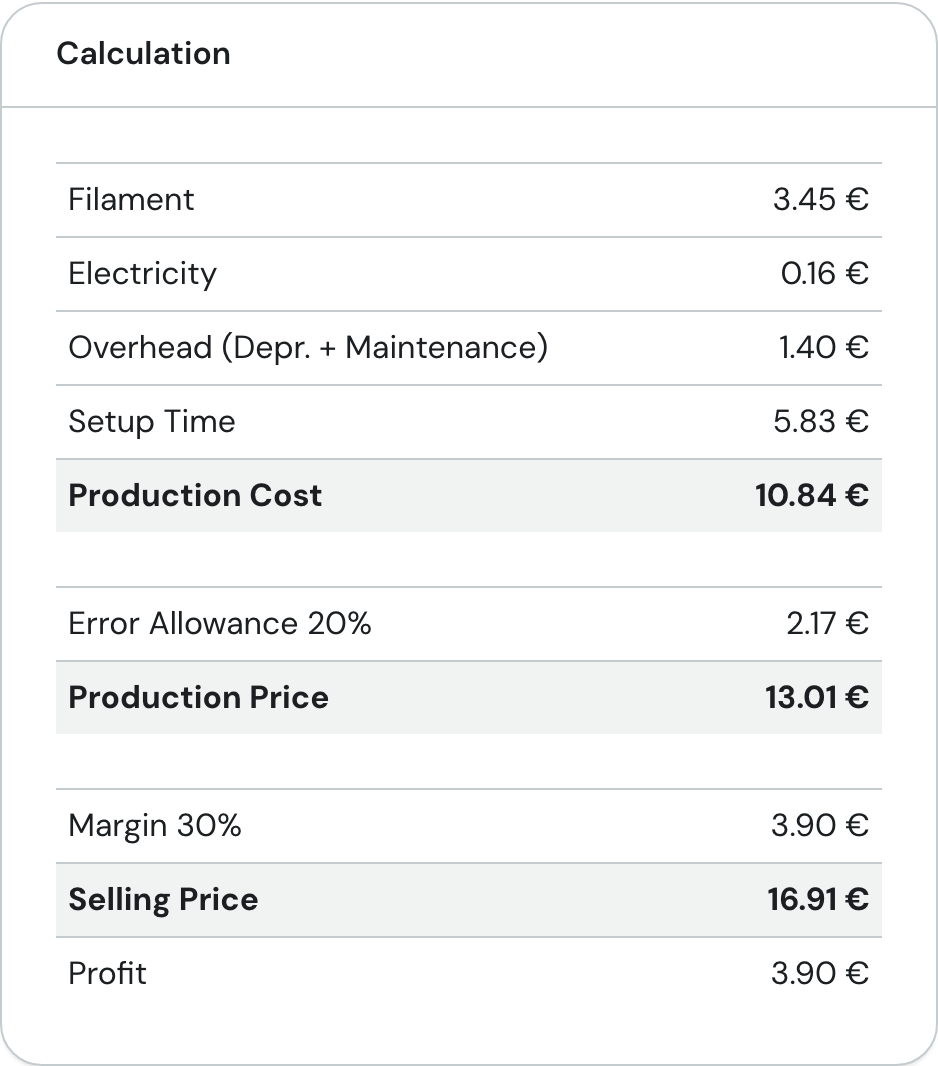
Look at the bold lines: they are the three subtotals Production Cost, Production Price and Selling Price.
If you have access to Bundles, use Add to Bundle at the bottom of the card to add the part to a bundle draft.
¶ Tips and FAQ
What does the calculator remember? Everything you enter on the "Calculator" tab, including your choice of printer and material, stays saved in your browser. It is not sent to the server and applies only on this device and in this browser. Reset at the top of the tab returns to the starting values.
- Using your own costs instead of the defaults: Change the cost configuration on the "Settings" tab and click Save locally. Only then does it stay saved in your browser; the tab shows the badge Local values active. Reset brings the defaults back. Without "Save locally" your changes last only until you reload the page.
- My printer or filament is not in the list: Choose Custom or enter the values directly in the fields. The purchase price is on your receipt, the watts are in the data sheet.
- The result is empty: The "Calculation" card only appears once filament or print duration is greater than 0.
- Several identical parts: Enter filament, print time, preparation and post-processing for one part and set Quantity. All lines are multiplied by the quantity.
- Calculating inside a number field: In any number field you can type a number, then +, -, * or /, and the next number. Enter, = or Tab writes the result into the field; Esc cancels.